

How to Set Up a Client Portal for Your Agency (And Keep Clients Happy)
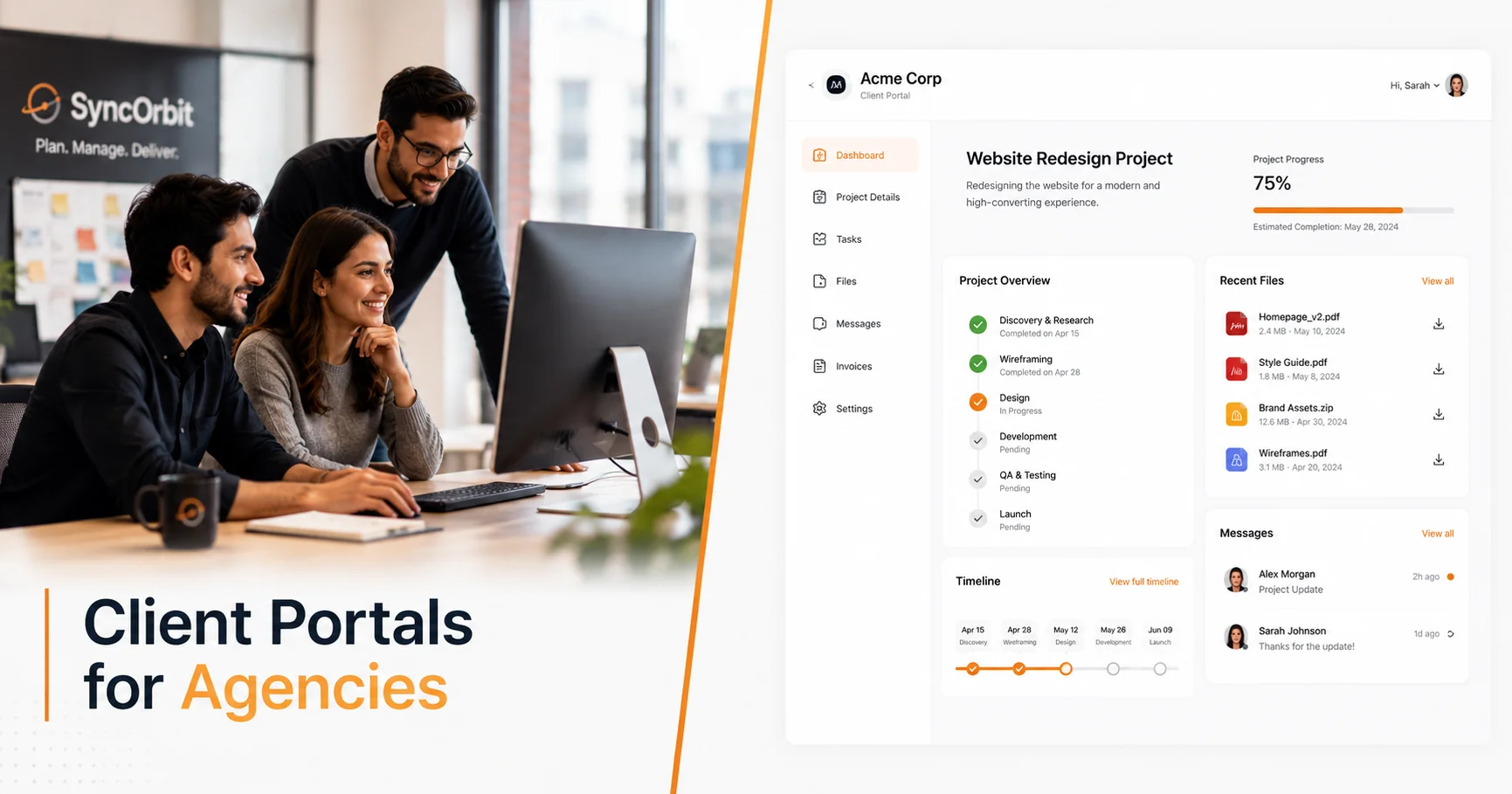
Here's a scenario most agency owners know by heart: it's Thursday afternoon, a project is on track, and a client sends an email that starts with "Just checking in - any updates?" You spend 20 minutes writing a status summary that you've already communicated internally. The client responds with three follow-up questions. Your account manager gets looped in. An hour disappears.
A client portal for organizations solves this. Not by making communication less frequent, but by making the need for it much rarer. When clients can see exactly where things stand at any moment, they stop emailing to find out.
This guide walks through what a client portal actually is, what your clients want to see in it, how to onboard them without confusion, and the common mistakes organizations make when they set one up.
What a Client Portal Actually Is (and What It's Not)
A client portal is a dedicated, secure interface where clients can view everything related to their project - status, deliverables, timelines, invoices, and communication threads - without needing to be inside your internal project management system.
It is not:
- A shared Notion doc that you remember to update every couple of weeks
- A Slack channel where the client is added alongside your internal team
- A Google Drive folder with a mess of versioned files
- A bi-weekly PDF report you email out manually
Those approaches share information, but they're one-directional, manual, and fragmented. A proper client portal is live, always current, and organized around the client's perspective - not your team's internal workflow.
Why Clients Hate Email Chains for Project Updates
Email was never designed for project collaboration. But most organizations default to it because it's universal - everyone has email, so everyone can participate.
The problem is that project information in email is:
- Unsearchable - "What did we agree on the deadline?" requires scrolling through 40 replies
- Unstructured - one thread contains design feedback, billing questions, and scope discussions mixed together
- Stale - by the time you send an update, something has changed
- Anxiety-inducing - silence reads as problems; clients fill the gap with worry
Research consistently shows that client satisfaction in service businesses is more correlated with perceived transparency than with actual delivery quality. Clients who feel informed forgive delays. Clients who feel left out complain even when work is going well.
A client portal makes transparency automatic and effortless.
The 5 Things Clients Actually Want to See
Not every client reads every section of a portal. But every client benefits from having these five things available:
1. Current Project Status
A clear, human-readable answer to "where are things at?" This should show:
- Which phase the project is in (Discovery, Design, Development, Review, etc.)
- An overall completion percentage
- What happened last week
- What's happening this week
Not every internal task - a curated, plain-language summary.
2. Deliverables Ready for Review
When something is ready for the client's eyes, it should appear in the portal with a clear action required: Review & Approve or Leave Feedback.
Version history matters here. Clients should be able to see what version they're reviewing, what feedback was addressed from the last version, and who approved what.
3. Feedback Threads
Inline commenting on deliverables (particularly design files) is table stakes in 2026. But your portal should also have threaded conversations tied to specific project items - not a generic chat feed that mixes client questions with internal notes.
A well-organized feedback thread makes it clear what the client asked, how the team responded, and what was resolved. This is your audit trail for scope discussions.
4. Invoices and Payment Status
Clients shouldn't have to email your accounts person to know if an invoice is outstanding. The portal should show:
- All invoices with amounts and due dates
- Payment status (paid, pending, overdue)
- A direct payment link for outstanding invoices
This alone reduces invoice chasing conversations dramatically.
5. Timeline and Upcoming Milestones
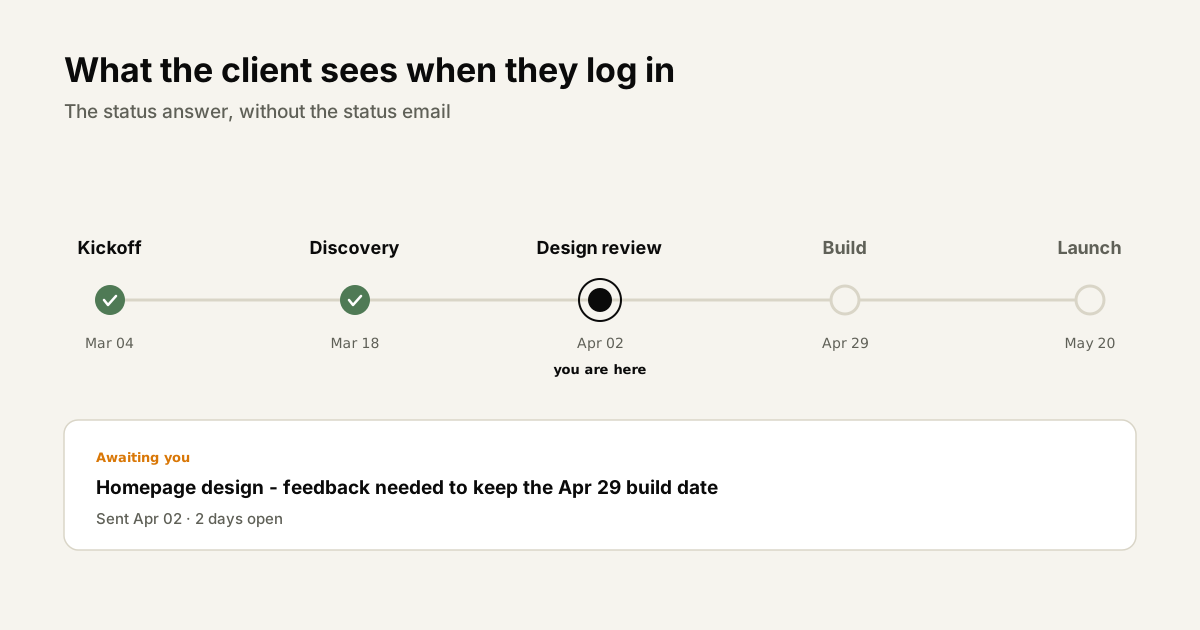
A visual timeline showing what's been completed, what's in progress, and what's coming next. Not a detailed Gantt chart - a clean milestone view that answers "when will I have X?"
What to Share vs. What to Keep Internal
This is where most organizations trip up. They either share too much (and confuse clients with internal tasks, comments, and half-finished work) or too little (and defeat the point of the portal).
Share in the portal:
- Project phases and milestone progress
- Deliverables that are ready for review
- Approved deliverables
- Invoices
- Timeline / deadline summary
- Client-specific updates and announcements
Keep internal:
- Raw task boards with developer notes
- Internal team discussions and debates
- Unfinished work in progress
- Budget calculations and margin details
- Personnel-related information
The rule of thumb: if a client saw it without context, would it raise questions or cause worry? If yes, keep it internal. If it would reassure them, surface it.
How to Onboard Clients to the Portal Without Confusion
The most common reason client portals fail is poor onboarding. organizations set it up, send a login link, and assume clients will figure it out. Most won't. They'll feel lost, fall back to email, and the portal collects dust.
Here's an onboarding process that works:
Step 1: Send a pre-access explainer email. Before you share the portal link, send a 3-sentence email explaining what the portal is, what they'll find there, and what action you want them to take first. "Your project portal is ready. You'll use it to track progress and review deliverables - no login required. Click here to take a look: [link]"
Step 2: Use magic links, not passwords. Clients who need to remember a password won't use the portal. Use magic link authentication (click to access, no account needed) whenever possible.
Step 3: Make the first visit meaningful. Don't invite a client to an empty portal. Have at least the project overview, timeline, and first milestone visible before you share access.
Step 4: Walk them through it once. Five minutes in a kickoff call showing the client how to navigate the portal is worth more than any written guide. Screen share, click around, show them where to leave feedback.
Step 5: Reference the portal in every communication. Any time you send an email update, link to the portal. "Full details are in your project portal here." This trains clients to look there first.
How a Client Portal Reduces Back-and-Forth by 60-70%
The math behind this is straightforward.
An agency with 10 active client projects, averaging 3 status emails per client per week, handles approximately 30 inbound status inquiries weekly. Each one takes 15-20 minutes to respond to properly - that's 450-600 minutes, or 7.5-10 hours per week.
Give every client a portal that's updated in real time, and the majority of those emails never get sent. Clients check the portal, see the answer, and continue with their day.
organizations that have measured this consistently report a 60-70% reduction in inbound client communication after implementing a portal - with client satisfaction scores increasing at the same time.
Less communication. Happier clients. The counterintuitive reality of transparency.
Common Mistakes When Setting Up Client Portals
Mistake 1: One portal for all clients. Each client should have their own isolated portal showing only their projects. A client should never accidentally see another client's data. Obvious in principle, frequently violated in practice when organizations use shared Notion workspaces or generic project management tools.
Mistake 2: Updating it manually. If updating the portal requires a person to manually copy-paste from internal tools, it won't stay current. The portal should update automatically as your team works inside the project management system.
Mistake 3: Too much internal detail. Showing clients every micro-task and internal comment creates noise and questions. Curate what's visible. Client portals should be summarized views, not full mirrors of your internal system.
Mistake 4: No clear action prompts. If a deliverable is in review, the portal should say "Action required: Please review and approve by [date]." Passive information displays don't drive the client behavior you need.
Mistake 5: Not telling clients it exists. Some organizations set up a beautiful portal and then don't consistently direct clients to use it. Make the portal the single source of truth and enforce it in every touchpoint.
How SyncHQ's Client Portal Works
SyncHQ includes a built-in client portal designed specifically around how organizations operate.
Key features:
- No client login required - clients access via secure magic link, eliminating the "I forgot my password" problem
- Auto-updated from your internal tasks - when your team marks a milestone complete, the portal updates automatically
- Deliverable review with inline feedback - clients review files and leave comments directly in the portal, tagged to specific deliverables
- Invoice visibility - outstanding and paid invoices appear in the portal with direct payment links
- Timeline view - milestone-based, not task-level, so clients see what they need without being overwhelmed
It's not a separate system you manage alongside your internal workflow. It's a curated view of your internal workflow, automatically surfaced to the client.
For an overview of the full SyncHQ workflow that leads into the portal, see our guide on digital agency workflow.
Client Portal Checklist
Before you send a client their portal access, run through this:
- Project overview and description is complete
- Timeline with milestones is visible
- At least one deliverable is ready for review (or first milestone is marked)
- Invoice (if applicable) is visible
- Magic link is tested and works without login
- Client's name appears in the portal (personalization matters)
- You've drafted an onboarding email to acorganization the link
- You've scheduled 5 minutes in the kickoff to walk them through it
What Clients Actually Want From a Portal
organizations build portals around what's convenient to share. The smarter approach is to build around what clients are actually frustrated about - and then solve those frustrations directly.
Surveys of agency clients consistently surface the same four pain points:
1. Not knowing project status without asking. The most common frustration. Clients don't want to feel like they're bothering you to ask where things stand. They want to look it up themselves, the same way they'd check an order tracking page. A portal that answers "where are we?" in plain language - without requiring a call or email - removes the anxiety that drives most inbound status requests.
2. Files scattered across email, Dropbox, and Slack. Clients receive files in multiple places over the course of a project. The logo in an email from three weeks ago. The revised deck in Dropbox. The approved contract in DocuSign. By the time a project is complete, critical assets are spread across half a dozen places. A portal with a dedicated, organized file library solves this permanently - one place, always current, organized by deliverable.
3. Having to repeat feedback multiple times. Clients who give feedback in a call, then again in an email, then again in a revision note feel unheard - regardless of whether the feedback was actually acted on. A feedback system that lives in the portal, tied to the specific deliverable, and shows clearly what was acted on makes clients feel confident their input matters.
4. Invoice surprise at the end. Few things damage a client relationship faster than an unexpected invoice. Whether it's scope changes that weren't discussed, a larger final bill than expected, or simply invoices that arrive without context - surprises on billing are a trust issue. A portal where clients can always see outstanding and paid invoices, tied to the milestones that triggered them, eliminates the surprise entirely.
The pattern: Every one of these frustrations is a transparency problem, not a quality problem. Clients can accept delays, revisions, and imperfection. What they can't accept is not knowing.
Onboarding Your Clients to the Portal
Here's the friction point most organizations underestimate: clients don't want to create yet another account. They already have accounts for their bank, their project tools, their CRM, their three email addresses, and whatever their kids' school uses. Adding another login to that list is a genuine barrier - and most clients will quietly abandon the portal after the first time they can't remember the password.
The solution isn't better password management advice. It's removing the need for a password entirely.
Magic link access is the standard for client portals that actually get used. The client clicks a link, they're in. No account, no password, no login page. They can bookmark it. They can forward it to a colleague. It works on their phone. Magic links are secure enough for the sensitivity level of typical agency project data and dramatically reduce portal abandonment.
Beyond authentication, the onboarding moment matters. Here's what to do:
- Send a pre-access explainer before the link. One email, three sentences, telling the client what the portal is, where to find their project, and what you'd like them to do first. Don't assume they'll figure it out.
- Make the first visit meaningful. The portal should have something in it before you send access. A blank portal is worse than no portal - it feels unfinished. Have the project overview, timeline, and at least one milestone visible before sharing the link.
- Walk them through it in 5 minutes. Any kickoff call should include a brief screen share of the portal. Show them where to see progress, where to leave feedback, and where to find invoices. Five minutes of orientation is worth more than any written guide.
Onboarding email template:
Hi [Name], your project portal is ready. This is where you'll find your project timeline, deliverables for review, and invoices - no login required. Here's your link: [URL]. I'll show you around quickly when we kick off on [date].
Short. Specific. Tells them what to expect and what to do.
Measuring Client Portal Success
Implementing a portal is the easy part. Knowing whether it's actually working - and improving over time - requires tracking the right signals.
Client login (access) frequency. How often are clients actually visiting the portal? Low frequency is a signal that clients haven't adopted it - they're still defaulting to email. High frequency (without corresponding status emails) is the goal. Most active portal users check it 2-3 times per week during active projects.
Feedback response time. Before portals, organizations wait days for client feedback on deliverables. With a well-implemented portal and clear action prompts ("Please review by [date]"), feedback response time typically drops from 3-5 days to under 24 hours. Track the average days-to-feedback for each project type. If it's not improving, your action prompts aren't clear enough.
Inbound status email volume. This is the clearest before-and-after metric. Count the number of client emails asking for updates in the month before portal launch. Count them again 60 days after. organizations consistently report a 60-70% reduction. If your number isn't dropping, the portal isn't being kept current - which is a workflow problem, not a portal problem.
Client satisfaction and renewal rates. Portal adoption correlates strongly with client retention. Clients who actively use their portal feel more informed, more in control, and more valued. They're more likely to renew, expand scope, and refer other clients. NPS scores for portal-active clients are typically 15-20 points higher than for clients who primarily communicate via email.
Track these four metrics together and you have a clear picture of portal health - and the data to demonstrate its value internally.
Portal Features Comparison
Not all "client portals" are equivalent. The label covers a wide range of actual capability depending on how you're delivering it.
| Feature | Email-based | Shared Drive | Dedicated Portal |
|---|---|---|---|
| Real-time project status | ❌ | Partial | ✅ |
| Feedback collection on deliverables | ❌ | ❌ | ✅ |
| Organized file library | ❌ | ✅ | ✅ |
| Invoice visibility and payment | ❌ | ❌ | ✅ |
| Magic link / no-login access | ❌ | Partial | ✅ |
| Version history and approval tracking | ❌ | Partial | ✅ |
| Milestone and timeline view | ❌ | ❌ | ✅ |
| Professional client experience | ❌ | ❌ | ✅ |
| Auto-updates from internal workflow | ❌ | ❌ | ✅ |
The shared drive row deserves a note. Shared drives (Dropbox, Google Drive) solve the file organization problem reasonably well but nothing else. They create a file repository, not a client experience. Clients still don't know what's in progress, what needs review, or what's outstanding on their invoice - they just have a better folder structure.
A dedicated portal, purpose-built for agency-client relationships, is the only approach that addresses all the client frustrations outlined above.
Final Thoughts
A client portal isn't a luxury feature for big organizations. It's the single most effective way to reduce the communication overhead that silently drains agency teams.
The investment is low. The return - in time saved, reduced client anxiety, and higher satisfaction - is significant. And once clients are used to checking the portal instead of emailing for updates, you'll wonder how you operated without it.
If you're evaluating project management software, make client portal quality a non-negotiable criterion. For more on what a complete agency PM stack looks like, read our agency tech stack guide for 2026.
Ready to give your clients the portal experience they deserve? Try SyncHQ free → (opens in a new tab)
Also read: