

The Agency Tech Stack: 12 Tools Top Digital organizations Use in 2026
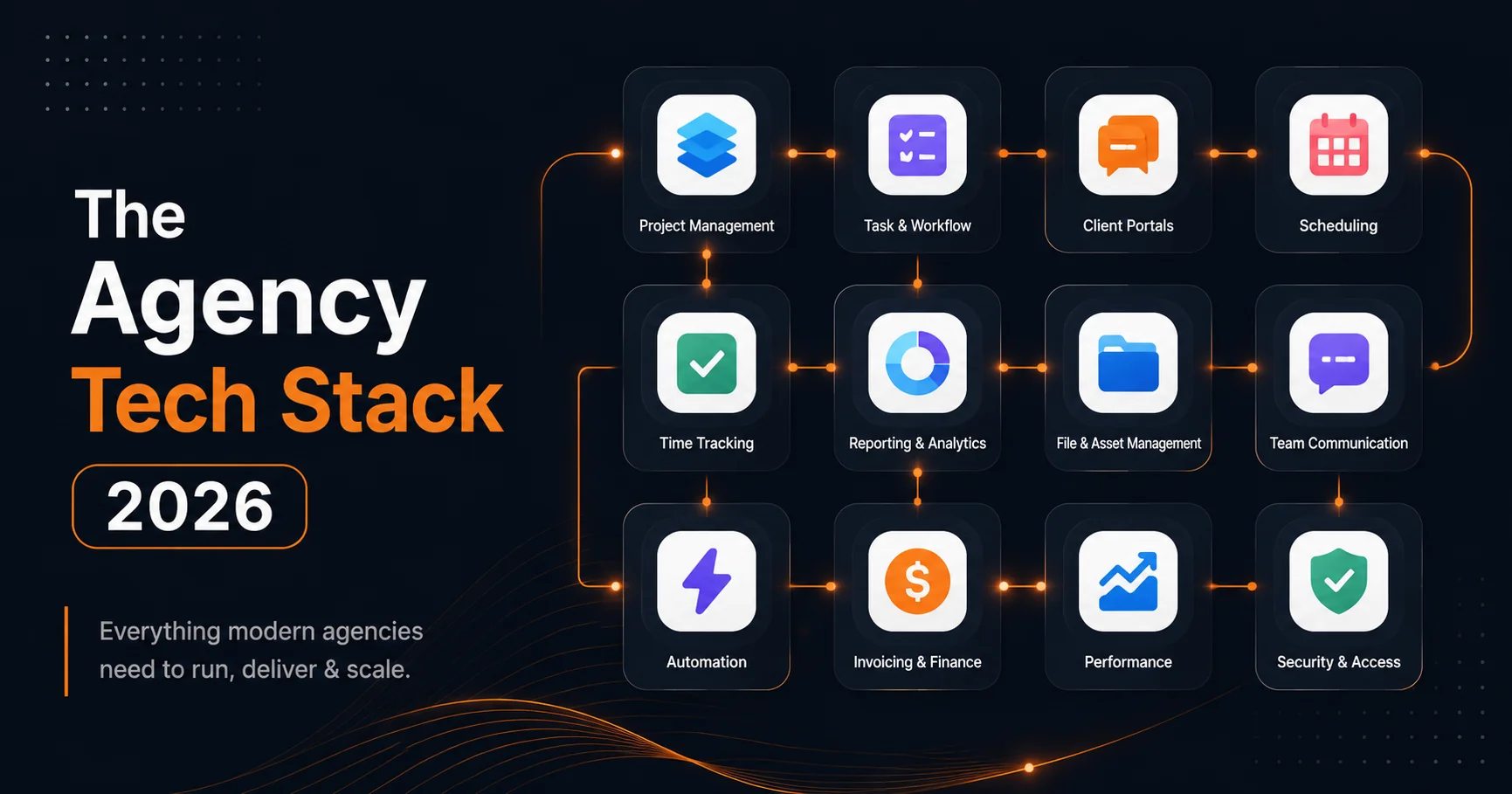
There's no single "right" tech stack for a digital agency. But there is a wrong approach: cobbling together tools reactively, one per problem, until you're paying for 15 subscriptions, manually copying data between them, and no one on your team fully knows how any of them work.
The best organizations in 2026 operate with a leaner stack than five years ago. Better integration, better all-in-one tools, and a clear decision-making framework for what to add versus what to consolidate. This guide breaks down the digital agency tech stack category by category, with specific tool recommendations and honest pros/cons.
The 6 Categories Every Agency Needs Tools For
Before evaluating specific tools, align your team on the categories. Every agency needs solutions for:
- Project management - tasks, timelines, client portals, briefs, time tracking
- Client communication - async updates, file sharing, feedback collection
- Design - creative work, collaboration, handoffs
- Development - code hosting, deployment, infrastructure
- Billing and finance - invoicing, payments, expense tracking
- Analytics - website performance, campaign measurement, reporting
The goal is to have one strong tool per category, with clean integrations between them. The trap is having three mediocre tools per category that don't talk to each other.
Category 1: Project Management
This is the most important category for organizations. Your project management tool is the operational backbone of everything else. Choosing wrong here costs you the most.
SyncHQ
Purpose-built for digital organizations. Includes AI client intake, client portal, time tracking, Gantt views, and project templates - all in one tool.
Best for: organizations of 5-50 people that want to reduce tool sprawl and have a PM system designed around their workflow rather than adapted from a generic tool.
Pricing: Free tier available. Professional from $29/seat/month.
ClickUp
Extremely powerful and highly customizable. The most feature-dense PM tool available.
Best for: Larger organizations or teams that need deep customization and have the bandwidth to configure it properly.
Cons: The customization that makes it powerful also makes it complex. Expect 2-4 weeks to properly configure for agency use. New team members take time to onboard.
Asana
Clean interface, solid task management, good automation capabilities. Widely adopted, which means most new hires will have used it before.
Best for: organizations that prioritize ease of onboarding and don't need deep client-facing features built in.
Cons: Client portal features are limited. Time tracking requires a third-party integration. Can feel expensive once you add the integrations needed to make it agency-ready.
Monday.com
Visual workflow boards with strong automation. Good for tracking high-level project status across a portfolio.
Best for: organizations that manage many concurrent smaller projects and need a bird's-eye portfolio view.
Cons: The per-seat pricing adds up fast. Deep task-level project management is less polished than ClickUp or Asana.
| Tool | Client Portal | Time Tracking | Intake/Brief | Gantt | Starting Price |
|---|---|---|---|---|---|
| SyncHQ | Native | Native | Native (AI) | Native | $29/mo |
| ClickUp | Limited | Native | No | Native | $7/seat |
| Asana | No | Integration | No | Native | $10.99/seat |
| Monday.com | Limited | Integration | No | Native | $9/seat |
Category 2: Client Communication
Once you have a client portal (ideally built into your PM tool), your supplementary communication stack becomes lighter.
Loom
Async video messaging. Instead of scheduling a 30-minute call to explain feedback on a design, record a 3-minute Loom. Clients can watch at their convenience and leave timestamped comments.
Best for: Design reviews, feature walkthroughs, project updates that are easier to show than describe.
Pricing: Free up to 25 videos. Business plan ~$12.50/seat/month.
Notion
Documentation and knowledge base. Useful for shared resources, internal wikis, and project notes - but not a replacement for a proper project management tool.
Best for: Storing SOPs, agency documentation, and shared knowledge. Not for active project tracking.
Cons: Without strict discipline, Notion workspaces become information graveyards. Everything goes in, nothing gets updated.
Figma Comments
If your agency does design work, Figma's built-in commenting is one of the best ways to collect design feedback. Clients can comment directly on specific design elements without needing any Figma account.
Best for: Design feedback cycles. Combine with a proper PM tool for project-level communication.
Category 3: Design
Figma
The dominant design tool for digital organizations in 2026. Browser-based, collaborative, handles UI/UX, branding, presentations, and developer handoffs.
Best for: Any agency doing digital design work. The collaborative features (simultaneous editing, commenting, component libraries) are unmatched.
Pricing: Free for up to 3 projects. Professional from $15/editor/month.
Adobe Creative Cloud
Still necessary for print, photography editing, and video - areas where Figma doesn't reach. If your agency does brand work that includes print or photography, you need the Adobe suite.
Best for: Print-ready assets, photo retouching, video production, advanced illustration.
Cons: Expensive ($55-$85/month per full CC subscription), desktop-only, steep learning curve.
Canva for Teams
For organizations that produce a high volume of social media, marketing, and presentation assets, Canva's team features offer a practical alternative to Adobe for simpler deliverables.
Best for: Social content, slide decks, email graphics, lightweight brand applications.
Category 4: Development
GitHub
Version control is non-negotiable. GitHub is the standard for code hosting, pull request workflows, issue tracking, and CI/CD pipeline integration.
Pricing: Free for public repos. Team plan from $4/user/month.
Vercel
The go-to deployment platform for Next.js and frontend projects. Handles preview deployments, edge networking, and production deployments with minimal configuration.
Best for: Frontend and JAMstack projects. Automatically deploys from GitHub branches.
Pricing: Free tier generous. Pro from $20/month.
Railway
Infrastructure-as-a-service for backend services, databases, and APIs. Simpler than AWS for most agency projects, cheaper than Heroku.
Best for: PostgreSQL databases, Node.js backends, background workers, anything that isn't pure static frontend.
Cloudflare
For organizations building performance-critical sites, Cloudflare provides DNS management, CDN, DDoS protection, and edge workers. Increasingly used as a platform layer (Pages, Workers, R2 storage) for projects that need global distribution.
Best for: CDN, security, and increasingly as a deployment target for edge applications.
Category 5: Billing and Finance
Stripe
The most flexible payment infrastructure for organizations that want to programmatically manage subscriptions, one-time payments, and invoicing. Requires developer setup but integrates with virtually everything.
Best for: organizations with recurring revenue, complex billing structures, or that want payment flows embedded in their client portal.
Fees: 2.9% + 30¢ per transaction.
Razorpay (for India-based organizations)
The equivalent of Stripe for the Indian market. Supports UPI, Net Banking, credit/debit cards, and INR billing. Essential if your clients or team is India-based.
Best for: organizations billing in INR or serving Indian enterprise clients.
Wave
Free accounting software for small organizations. Handles invoicing, expense tracking, and basic financial reporting without a monthly fee.
Best for: organizations under $500K ARR that want basic bookkeeping without paying for QuickBooks.
Cons: Lacks the depth of QuickBooks. Limited integrations. Won't scale well beyond the basics.
Category 6: Analytics
Google Analytics 4
The default starting point for any agency tracking website performance. The learning curve from Universal Analytics to GA4 is steep, but it's still the most powerful free analytics platform.
Best for: Website traffic, conversion tracking, audience analysis. Required for any client reporting stack.
Pricing: Free.
Hotjar
Heatmaps, session recordings, and user feedback. Invaluable for UX research, redesign projects, and demonstrating value to clients ("here's what users are actually doing on your site").
Best for: Any project with a UI/UX deliverable. Great for building compelling client reports.
Pricing: Free basic plan. Plus from $39/month.
Plausible
Privacy-first, GDPR-compliant analytics. Simpler dashboard than GA4, with no data sampling and no personal data collection.
Best for: European clients, clients that want GDPR compliance without the cookie consent headache, or organizations that want simple analytics as a secondary view.
Pricing: From $9/month per 10K pageviews.
The Hidden Cost of Tool Sprawl
Most organizations don't realize how expensive their stack really is until they add it up.
A typical mid-size agency (10 people) using separate tools for every function might be paying:
| Tool | Monthly Cost |
|---|---|
| Asana (10 seats) | $110 |
| Harvest time tracking | $120 |
| FreshDesk client communication | $150 |
| Notion (10 seats) | $80 |
| Loom Business (5 seats) | $63 |
| Toggl Track | $90 |
| Total | $613/month |
And that doesn't account for the integration tax - the time your team spends manually moving data between tools, the inconsistencies that arise from multiple sources of truth, and the cognitive overhead of switching between 6 different apps to understand one project's status.
A purpose-built agency PM tool that consolidates project management, time tracking, client portal, and intake into one tool might cost $200-$300/month for the same team - while eliminating 4 hours/week in tool-switching friction.
How to Consolidate Your Stack
The goal isn't to reduce to a single tool. It's to reduce to the minimum viable set with clean integrations between categories.
Start with your project management layer. This is your hub. Everything else should connect to it.
Audit your current tools. List every tool you pay for. For each one, ask: Is this covered by our PM tool? Is it truly necessary? Can it be replaced by a better-integrated alternative?
Eliminate the overlaps first. You probably don't need both Notion and a PM tool. You probably don't need both Harvest and a PM tool with built-in time tracking.
Integrate the specialists. Some tools are worth keeping even if they're not integrated - Figma, GitHub, your billing tool. But they should connect to your PM hub via webhooks or native integrations where possible.
For a detailed look at how your tool stack supports your complete project workflow, read our guide on the digital agency workflow from intake to delivery.
The Hidden Costs of a Fragmented Stack
Most agency leaders think about tool costs in terms of subscription fees. That's the visible number. The invisible number - the integration tax - is usually larger.
The integration tax has four components:
Manual data entry between tools. Every time your team copies time entries from a time tracker into an invoice, or pastes project updates from Slack into a client email, or exports a task list from your PM tool into a spreadsheet for the client meeting - that's manual data transfer that a better-integrated stack would eliminate. Each transfer takes 5-20 minutes and introduces errors.
Context switching between apps. Every time a team member switches from your PM tool to Slack to email to their time tracker to their design app and back, they pay a cognitive switching cost. Research on knowledge workers consistently puts this at 15-20 minutes of lost focus per interruption. In a fragmented stack, these switches happen constantly.
Onboarding new team members across all tools. When a new hire joins, they need access to and training on every tool. If you're running 7 tools, that's 7 account setups, 7 permission configurations, and 7 tool-specific workflows to learn. This adds days to onboarding and increases the likelihood that new team members develop workarounds instead of adopting your actual process.
Support spanning multiple vendors. When something breaks across two integrated tools, both vendors tell you it's the other one's problem. With a consolidated stack, you have fewer integration points and a single point of support for the tools that matter most.
Reality check: A 10-person agency with 7 tools and 30 daily tool switches loses approximately 10 person-hours per day in switching costs alone. At $75/hour fully loaded, that's $750/day - $195,000/year - that doesn't appear on any subscription invoice.
The calculation: 30 switches × 2 minutes average × 10 people = 600 minutes = 10 hours daily.
How to Audit Your Current Stack
Before you can consolidate, you need a clear picture of what you're actually using. Most organizations are surprised by what they find.
Step 1: List every tool the team uses weekly. Not what you pay for - what's actually being used. Ask your team to name every app they open in a typical week. Include browser bookmarks, Chrome extensions, and mobile apps. You will almost certainly discover tools being used that you've forgotten you subscribed to.
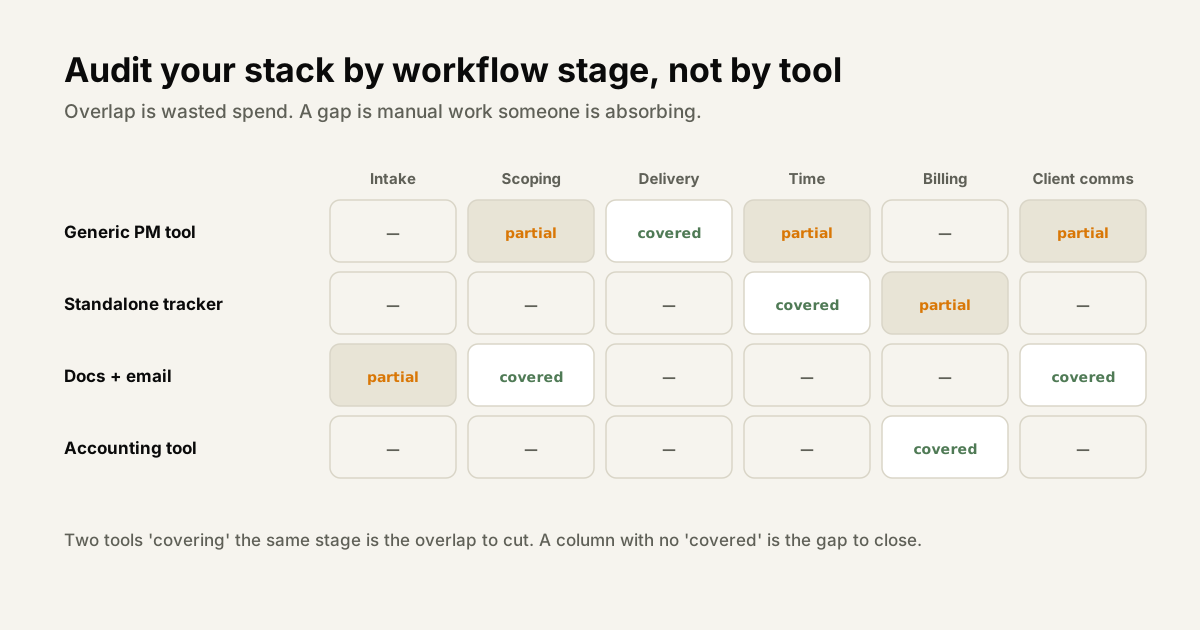
Step 2: Map which workflow stage each tool serves. Group your list by stage: client acquisition, intake/briefing, project execution, client communication, file management, time tracking, billing, analytics. Most organizations find 2-3 tools serving the same stage and 1-2 stages with no clear tool at all.
Step 3: Find overlaps and gaps. Overlaps are where you're paying twice for the same function. Gaps are where your team has improvised a workaround (usually spreadsheets or email) because no tool covers that stage well.
The output is a simple stack map - a one-page diagram showing your tools, their workflow stage, and the connections between them. Once this is visible, the consolidation decisions become obvious. You'll likely find 2 tools for communication, 2 for file storage, and a complete absence of anything handling client portals or structured intake.
The One-Platform vs. Best-of-Breed Debate
Every agency eventually faces this choice: consolidate everything into one platform, or maintain a curated set of best-in-class tools for each function. Both approaches have merit. The right answer depends on your agency's specific situation.
One platform wins when:
- Your team size is under 20 people and the operational overhead of managing integrations exceeds the value of specialized tools
- Your budget for developer time to maintain integrations is limited or zero
- Your workflow is standard - websites, branding, campaigns, content - rather than highly specialized
- You're growing and can't afford the onboarding friction of teaching new hires 7 different tools
- You value a consistent, unified data model where client, project, time, and invoice data all live in the same place
Best-of-breed wins when:
- You have a developer (in-house or on retainer) who can build and maintain API integrations between tools
- One part of your work is genuinely specialized in a way a generalist tool can't serve - high-volume video production, hardware product development, enterprise compliance workflows
- You need enterprise-grade depth in a specific area that no all-in-one tool provides - advanced analytics reporting, complex subscription billing, multi-language design asset management
The pragmatic view:
Most organizations under 25 people are better served by a consolidated platform than by best-of-breed specialization. Accepting 20% less depth in each category in exchange for 80% less operational friction is a good trade for most. The specialized tools your work genuinely requires - Figma for design, GitHub for code, GA4 for analytics - can sit alongside the platform without creating fragmentation, because they serve clearly separate workflows.
The organizations that benefit most from best-of-breed approaches tend to be larger (25+ people), technically sophisticated, and have at least one workflow so specialized that a general PM tool genuinely can't serve it. For everyone else, the operational simplicity of consolidation wins.
Tip: When evaluating whether a specialized tool is worth adding to your stack, ask: "Does this tool's unique capability generate revenue or save time that justifies both its subscription cost and the integration overhead of connecting it to everything else?" If the answer isn't clearly yes, the tool probably doesn't belong in a lean agency stack.
Auditing what you already have
Before adding anything, most agencies would benefit more from an audit of what is already in place. It takes an hour and typically finds three things.
Tools nobody uses. Subscriptions that survived a trial, a departed employee's preference, or a project that ended two years ago. Cancelling them is free money and the list is usually longer than expected.
Two tools doing one job. The most common form of stack sprawl - two places where tasks live, two places files are shared, two ways requests arrive. The cost is not the subscription, it is that neither is authoritative, so people check both and trust neither.
A stage with no tool at all. Usually the commercial layer: scope changes tracked nowhere, retainer burn calculated by hand, project margin assembled monthly from three exports. Gaps are less visible than overlaps because nobody is paying for them, and they cost considerably more in time.
Map your stack against the stages of the work - intake, scoping, delivery, time, billing, client communication - and mark each stage as covered, duplicated or missing. The duplicates are the saving; the gaps are the opportunity.
The question to ask before adding anything
Before any new tool enters the stack, one question prevents most of the sprawl: which existing tool does this replace?
If the answer is none, you are not consolidating, you are accumulating - and every additional tool carries a cost beyond its subscription: another place information lives, another integration to maintain, another thing to onboard people into, and another candidate for becoming the system nobody quite keeps current.
The second question is who owns it. A tool with no named owner will be configured once, drift, and eventually be worked around rather than fixed.
Summary: The Recommended 2026 Agency Stack
| Category | Recommended Tool | Notes |
|---|---|---|
| Project management | SyncHQ | Intake, portal, time tracking built in |
| Async video | Loom | Reduce unnecessary calls |
| Design | Figma | For UI/UX; Adobe CC for print/photo |
| Code hosting | GitHub | Non-negotiable |
| Deployment | Vercel + Railway | Frontend + backend |
| CDN/Security | Cloudflare | Performance and protection |
| Payments | Stripe or Razorpay | Depends on market |
| Analytics | GA4 + Hotjar | Measurement + UX insight |
Nine tools total. Each best-in-class for its category. Three of the most common agency tools (separate time tracker, client communication, intake/brief) eliminated by choosing the right PM foundation.
Also read: