

Digital Agency Workflow: From Client Intake to Project Delivery
The organizations that consistently deliver on time aren't the ones with the most talented teams. They're the ones with the most repeatable processes. A digital agency workflow that's been documented, refined, and handed to every new team member means clients get the same quality experience on project five as they did on project one - regardless of who runs the account. Without that, even a brilliant team produces inconsistent results and grows at a ceiling.
This guide walks through the complete six-stage workflow that high-performing organizations use, explains the common failure points at each stage, and shows you how to build templates and policies that make the workflow stick.
The Problem With Winging It
Most organizations start without a documented workflow. The founders know how they like things done. They do it themselves, then hire people they trust to figure it out. Projects get delivered. Clients are mostly happy. It works - until it doesn't.
The "it's different for every project" myth is the first thing to dismantle. It's true that every client is different and every project has unique requirements. It doesn't follow that the process for managing those projects should be different each time. The intake questions are the same. The approval flow is the same. The invoicing structure is the same. The communication cadence is the same. The creative work is unique; the operational shell around it doesn't have to be.
When there's no documented process, knowledge lives in people's heads. Your best project manager knows how your agency handles revision requests, when to flag scope creep, how to structure a kickoff call. When they leave - and eventually, they leave - that knowledge walks out with them. The next person starts from scratch, makes different decisions, and clients notice the inconsistency.
There's also a compounding cost to ad-hoc operations that's harder to quantify. Agency owners who lack defined workflows tend to spend 30-40% of their time firefighting operational issues - chasing approvals, resolving miscommunications, reconstructing project history, handling client complaints about missed expectations - rather than growing the business. That's not a people problem. It's a systems problem.
The solution isn't bureaucracy. A well-designed workflow isn't a stack of forms and approval gates that slow everything down. It's a lightweight structure that makes good decisions the easy default - so your team spends their energy on the work, not on figuring out what to do next.
The 6-Stage Digital Agency Workflow
Before diving into each stage, here's the shape of the complete workflow:
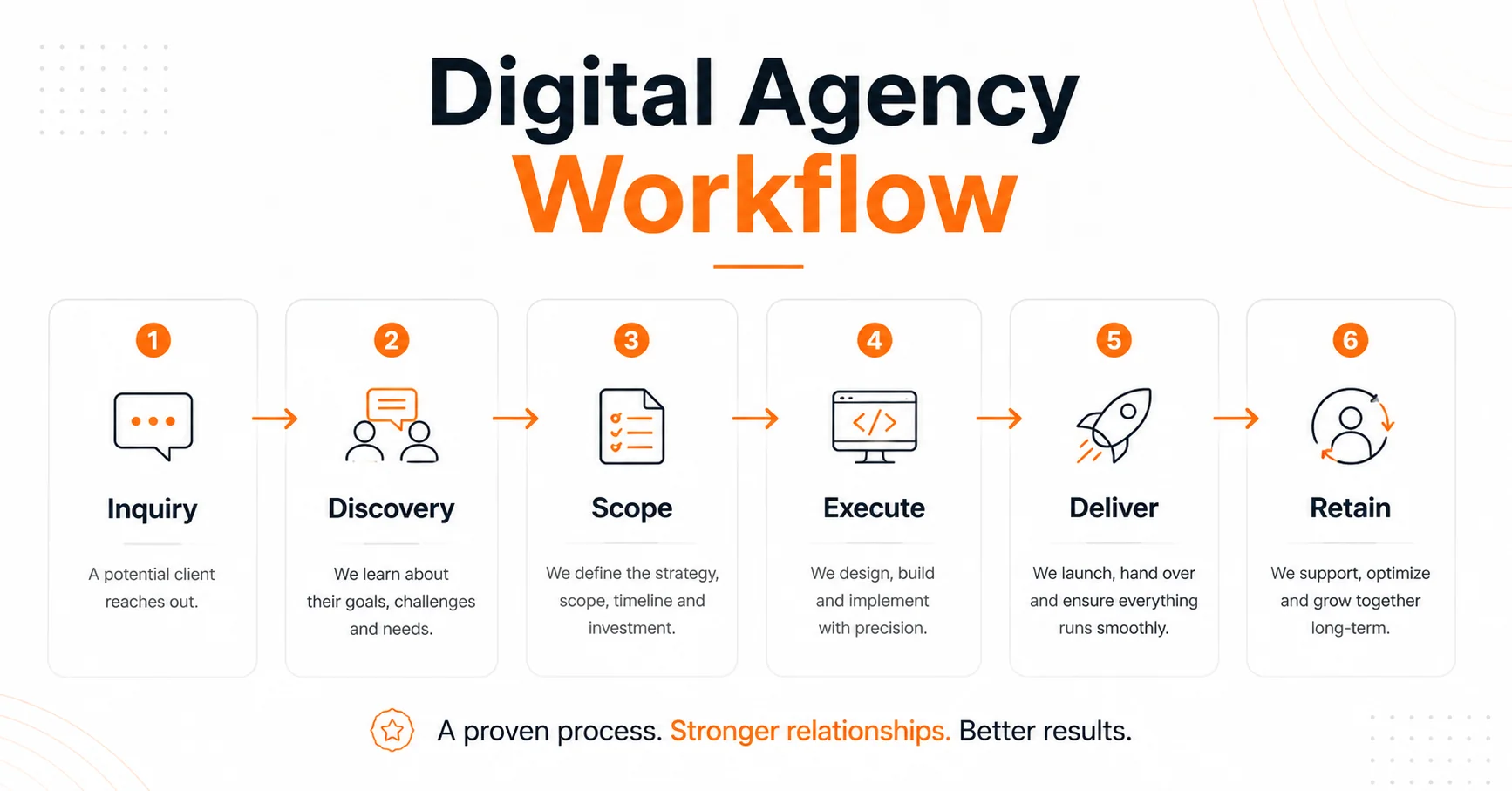
Stage 1: Client Inquiry and Qualification → Stage 2: Discovery and Brief Creation → Stage 3: Scoping and Proposal → Stage 4: Project Execution → Stage 5: Delivery and Handoff → Stage 6: Invoice, Retain, and Grow
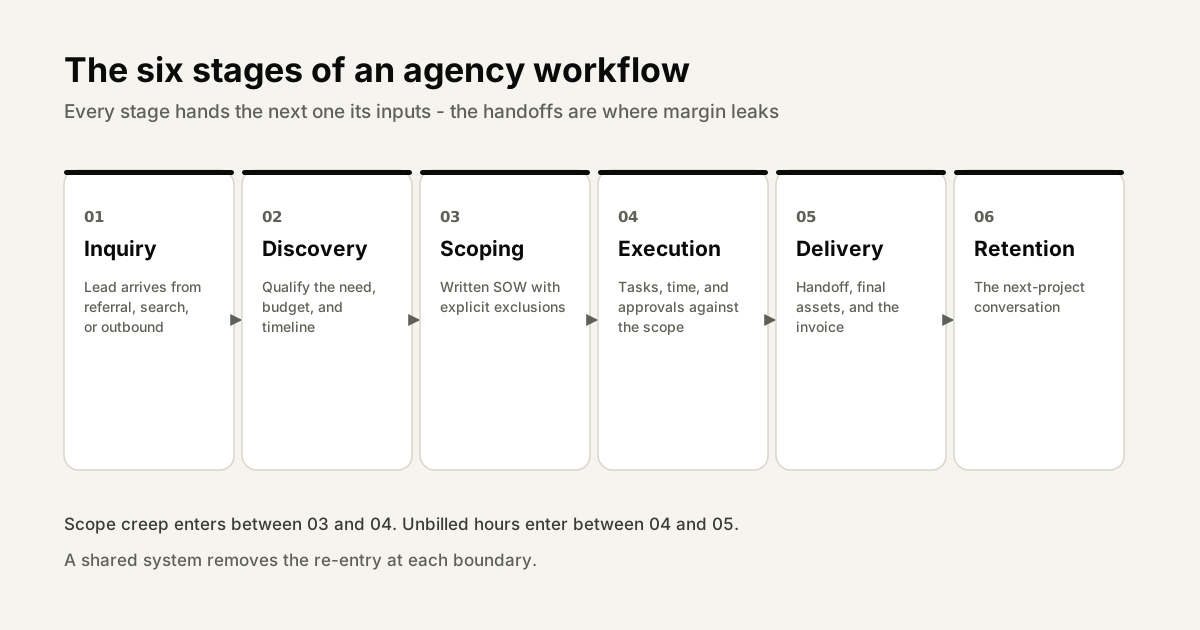
Each stage has a clear output - a document, a signed agreement, a deliverable - that marks completion and triggers the next stage. That clarity is what makes the workflow repeatable.
Stage 1: Client Inquiry and Qualification
The first stage is often treated casually, as if the only job is to respond quickly and be friendly. That undersells it. Qualification is one of the highest-leverage activities in your agency. Choosing the right clients - and declining the wrong ones early - shapes your workload, your profitability, and your team's morale for months.
Response time matters more than most organizations realize. Research on lead response rates consistently shows that response within the first hour dramatically outperforms later responses in conversion rate. For organizations, this doesn't mean you need to answer every inquiry personally within 60 minutes. It means you need an automated or templated first response that acknowledges the inquiry, sets expectations, and asks one or two qualifying questions - so the prospect feels seen and the conversation starts moving.
Budget and timeline are non-negotiable qualification criteria. Some organizations avoid asking about budget early because it feels uncomfortable. The result is spending 3 hours on a discovery call and a proposal, only to find out the prospect has a budget of $3,000 for a project you'd charge $18,000 for. Ask about budget in your initial intake. You don't need an exact number - "are you expecting to invest under $5,000, $5,000-$20,000, or over $20,000?" - but you need enough information to know whether it's worth your time.
A qualification scorecard helps standardize the decision. Score each inquiry on: budget fit, timeline fit, project type fit (are you set up to do this well?), decision-maker access (are we talking to the person who can sign?), and cultural fit. A score below a threshold goes to a polite decline email. Above it, moves to Stage 2. This removes the guesswork and the guilt from the decision.
Stage 2: Discovery and Brief Creation
Discovery is the most consistently underinvested stage in agency workflows. It's also the stage that determines whether the rest of the project goes smoothly or becomes a series of expensive course-corrections.
What discovery actually means for organizations is different from what it means for in-house product teams running user research sprints. For an agency, discovery is the structured process of understanding a client's goals, constraints, audience, competitive context, and approval landscape well enough to produce a brief that everyone agrees on before work begins. It typically takes one to two hours of structured conversation - or, increasingly, a well-designed async intake flow.
The 10 questions every discovery session must answer:
- What is the primary business goal this project needs to serve?
- How will we measure success - what does a good outcome look like in 6 months?
- Who is the target audience, and what do they need to feel or do as a result of this work?
- Who are your main competitors, and what's your positioning relative to them?
- Are there reference examples - things you love, things you hate?
- What's the timeline, including any hard deadlines?
- What's the budget range for this engagement?
- Who is involved in approvals, and what does the sign-off process look like?
- What constraints exist - brand guidelines, legal requirements, technical limitations?
- What has been tried before that didn't work, and why?
The output of discovery is a signed project brief - a single document that captures the answers to these questions and becomes the reference point for the entire project. If scope disputes arise later, the brief is the source of truth.
AI-powered intake tools can now handle a significant portion of the discovery process asynchronously, without a scheduled call. A structured chat flow that asks the right questions, adapts based on answers, and generates a formatted brief draft saves 45-60 minutes per client and removes scheduling friction from the front of every engagement. Read more in our guide to AI client intake for organizations.
Stage 3: Scoping and Proposal
The discovery brief tells you what the client needs. The scope document tells you exactly what you're going to deliver, when, and for how much. The distinction matters because briefs are aspirational and scopes are contractual.
The SOW, the proposal, and the brief are three different documents. Many organizations conflate them, which creates confusion later. The brief captures client goals and context. The proposal is what you send to win the business - it includes strategic thinking, examples, and a price. The Statement of Work (SOW) is what you both sign - it's the precise list of deliverables, timelines, revision rounds, and exclusions. You need all three, in that order.
Scope creep almost always originates in the scoping stage, not the execution stage. It happens when deliverables are described vaguely ("a website redesign"), revision rounds aren't specified ("revisions as needed"), or exclusions aren't listed ("this includes all copywriting"). When scope is ambiguous, clients fill the ambiguity with their own interpretation - which is almost always more generous than yours. Be specific. Name every deliverable. Specify exactly how many rounds of revisions are included. List what's explicitly not included.
Two scoping approaches suit different project types: milestone-based scoping breaks the project into phases (Discovery, Design, Development, Launch) with a price and deliverable for each phase. Deliverable-based scoping lists each specific output (Homepage design, 5 interior page templates, Mobile responsive, CMS integration) with a price per item. Milestone-based works better for complex, long-duration projects where the full scope isn't known at the start. Deliverable-based is more transparent and easier for clients to understand.
Getting sign-off should be formal and documented. An email reply saying "looks good" isn't sufficient. Use a digital signature on the SOW, or at minimum a written confirmation that references the specific document and version.
Stage 4: Project Execution
This is the longest stage and the one with the most failure points. A solid scoping stage sets up a good execution, but execution has its own set of traps.
The kickoff meeting sets the tone for the entire project. A kickoff isn't a formality - it's the first opportunity to align on how the working relationship will operate. A good kickoff covers: the project timeline and key milestones, the communication cadence (how often will there be update calls? how fast should both sides respond to messages?), the approval process (who approves deliverables? what's the turnaround time expectation for feedback?), and the change request process (what happens when the client wants something outside the scope?). Clients who understand the process at the start cause fewer surprises mid-project.
Sprint planning vs. milestone planning depends on project type. Design and branding projects often work best with milestone-based planning - phase one due by this date, phase two by that date. Development projects may benefit from sprint cycles with defined outputs every one or two weeks. The key is that the plan is written down, shared with the client, and the team is working from a single source of truth - not from a mix of email chains and memory.
Async updates reduce meeting overhead without reducing visibility. Many organizations over-schedule client check-ins, spending hours per week on status calls that could have been a written update. A brief weekly written update - what was completed, what's coming next, any questions or blockers - takes 10 minutes to write and keeps clients informed without requiring real-time availability from your team. Reserve live calls for decision points, not status updates.
Client approval management within the workflow is where many projects stall. Deliverables get submitted for review and nothing happens for a week. Build feedback deadlines into your project timeline explicitly. "Feedback required by [date] to maintain the project schedule" - in writing, in the project plan. When feedback doesn't arrive on time, send a gentle automated reminder rather than waiting and hoping. Delays that originate on the client side shouldn't push your team's deadline without documentation.
Scope creep management during execution requires a clear, practiced response. When a client requests something that wasn't in the SOW, the response shouldn't be "sure, no problem" or "no, that's out of scope." It should be: "That's a great idea. It's not in the current scope, so we'd handle it as a change request - I'll send you a quick estimate for that work and we can decide how to proceed." That response is professional, flexible, and firm. It treats scope changes as normal business rather than confrontations.
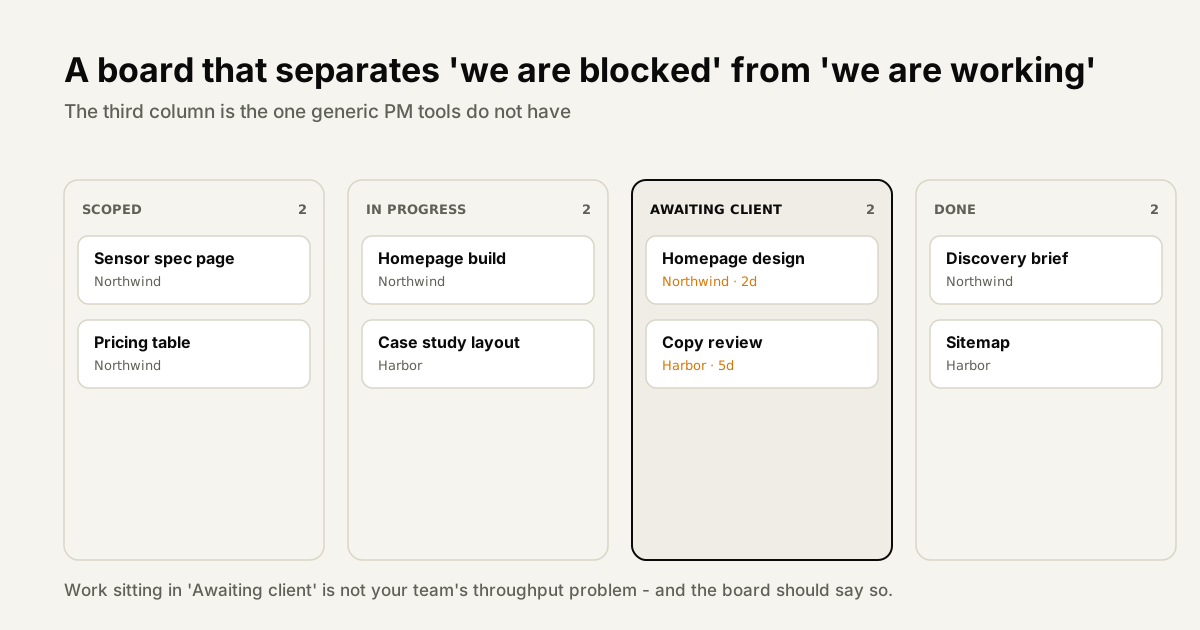
The change request process should be lightweight enough that people actually use it. A one-page email template or a simple form works fine. What matters is that every scope change is documented in writing before the work starts, includes a price, and gets explicit sign-off. This protects the agency and gives the client clarity on what they're approving.
Stage 5: Delivery and Handoff
"Done" is not the same as "shipped." Delivery is a stage, not a moment, and how you handle it determines whether clients feel confident or anxious about what they received.
A final review checklist before anything goes to a client prevents the small errors that erode trust. Depending on your project type, this might include: brand consistency check, cross-browser or cross-device testing, proofreading, link verification, performance benchmarks. The checklist should be the same every time - which means it should be a literal document that someone works through, not a mental scan before hitting send.
The client sign-off process should be explicit and documented. Don't assume that because you sent the deliverable, the project is approved. Send a formal delivery message that says: "This is the final deliverable for [project]. Please review and confirm your approval by [date]. Once we receive your sign-off, this project will be marked complete." That clarity closes the loop and starts the invoice clock.
Knowledge transfer documentation is particularly important for technical projects. If you've built a website, your client needs documentation that covers: how to update content, how to add pages, what the hosting and maintenance setup is, who to contact for technical issues. organizations that skip this end up fielding support requests for months after a project ends - unpaid support, at that.
Be explicit about the warranty or post-launch support period. Most organizations offer some period of post-delivery fixes - "any bugs or issues found within 30 days of launch will be addressed at no charge." But the boundary matters. What counts as a bug versus a new feature? What's the response time commitment? Clients who understand the warranty period are less likely to treat your entire relationship as free ongoing support.
Stage 6: Invoice, Retain, and Grow
The final stage is where the financial and relationship outcomes of the project get locked in - and where many organizations leave significant money on the table.
Invoicing should be triggered by milestones, not by memory. If your project plan has clear milestones, each milestone should have a corresponding invoice in your billing system that becomes due when the milestone is delivered and approved. Manual invoicing - where someone remembers to send an invoice after the fact - creates delays, inconsistencies, and cash flow uncertainty. Milestone-based invoicing is automatic, clear for the client, and maintains your cash flow throughout the project.
The retention conversation has a specific window. The best time to discuss future work isn't at the end of the project - by then, the client is already thinking about what's next and you have no leverage. The best time is in the final weeks of execution, when the relationship is at its warmest and you have clear visibility into what's coming after delivery. Plant the seed: "Once this is wrapped up, are there other initiatives coming up where we could support you?"
The offboarding checklist that leads to repeat business includes: final deliverable delivery, invoice, project documentation, a short post-project survey, a case study request, and a referral ask. Each of these is a natural next step, and each is easier to do when it's on a checklist than when you're trying to remember what should happen at the end of every project. organizations that systematically ask for referrals get referrals. organizations that wait for referrals to happen organically get them less often.
Building Reusable Templates for Each Stage
Templates are the operational infrastructure of a scalable agency. They're what makes it possible for a new team member to run a project without needing to shadow a senior PM for three months first.
A useful project template isn't just a task list. It includes: the standard task structure for that project type, the client-facing milestones and their sequence, the review and approval checkpoints, the documents that need to be created (brief, SOW, kickoff agenda, status update format), the communication cadence, and the handoff checklist. That's a complete operational guide in template form.
Different project types need different templates. A website redesign project has very different stages and dependencies than a brand identity project or an ongoing content retainer. Build a template for each project type you deliver regularly - typically, organizations can cover 80% of their work with 3-5 templates.
The discipline that separates organizations with great templates from those with mediocre ones is version control. When you learn something from a project - a stage that went wrong, a communication pattern that worked better - update the template before you start the next project. Templates should improve continuously, not sit frozen from the day they were created.
The Stack Problem: Too Many Tools, Not Enough Integration
One of the most common sources of workflow breakdown in organizations isn't a process failure - it's a tooling failure. Specifically, it's the fragmentation that comes from using a different tool for every stage of the workflow.
| Stage | Typical tool(s) |
|---|---|
| Client inquiry / intake | Email, contact form, Typeform |
| Discovery and brief | Google Docs, Notion, Word |
| Proposal and scoping | PDF, Notion, Canva |
| Project execution | Trello, Asana, Monday.com |
| Team communication | Slack, Teams, email |
| Time tracking | Toggl, Harvest, spreadsheets |
| Client communication | Email, Loom, Zoom |
| Invoicing and billing | Xero, QuickBooks, FreshBooks |
| Client updates and approvals | Email, Loom, PDF |
The problem isn't that any of these tools is bad. The problem is that data created in one tool doesn't automatically flow to the next. The intake response lives in Typeform. The brief is in Google Docs. The project is in Asana. The time entries are in Toggl. The invoice is in QuickBooks. Nothing talks to anything else. Every time information moves between stages, someone has to manually transfer it - copy-pasting, reformatting, updating.
The result: every project requires 15-20 minutes of manual data transfer at each stage transition. Across 10 active projects, that's hours per week of pure overhead with no client value. And every manual transfer is an opportunity for something to fall through the cracks.
The solution is consolidation, or tight integration. Either move to a platform that handles multiple stages natively, or invest in integrating your existing tools so data flows automatically. The first option is simpler and typically more reliable. The second is workable but requires ongoing maintenance.
Benchmark: organizations that consolidate their workflow onto an integrated platform report saving an average of 5-8 hours per week on operational overhead per project manager - time that moves from administration back to billable or business development work. (Agency Operations Survey 2025)
How to Implement This Workflow in Your Agency (30 Days)
Workflow change doesn't happen because you write a new policy document and send it to the team. It happens through deliberate, staged implementation with feedback loops.
Week 1 - Document your current workflow. Before you change anything, map what actually happens today. Interview your PMs and account managers: walk me through exactly what happens from when a new lead comes in to when the invoice is paid. Write it down as-is, not as you wish it were. You'll find the gaps, the workarounds, and the stages where things most often break.
Week 2 - Identify the 3 biggest breakdown points. From your current-state map, identify the three places where projects most often stall, information gets lost, or clients express frustration. These are your first targets for improvement. Fix the biggest problem first, not the easiest problem first. Common candidates: no formal discovery/brief stage, scope living in email rather than a signed document, billing happening late and manually.
Week 3 - Implement the stage templates. For your most common project type, build a complete template: task structure, milestones, documents, communication touchpoints, approval checkpoints, handoff checklist. Roll it out on one new project. Have the team follow it exactly, even where it feels unnecessary, so you can see how it holds up in practice.
Week 4 - Team training and feedback collection. Run a 30-minute session with your team to walk through the new workflow. Get their feedback on what's creating friction and what's working. Adjust the template based on what you learn. The goal at the end of month one isn't a perfect workflow - it's a documented, evolving workflow that the team owns.
Common Workflow Mistakes (And How to Fix Them)
Even organizations that have documented workflows tend to make a handful of recurring errors. Here are the ones that come up most often, and how to address them.
Mistake 1: Discovery is a conversation, not a structure. An unstructured discovery call produces inconsistent briefs - good ones when an experienced PM runs it, mediocre ones otherwise. The fix: structured intake with required fields. Every discovery must answer the same 10 questions, regardless of who's on the call. Use an intake tool or a required-field form.
Mistake 2: Scope lives in email threads. If the scope of work was negotiated over a series of emails and never compiled into a single signed document, you don't have a scope - you have a dispute waiting to happen. The fix: a formal SOW document, signed before work begins. Every scope change produces a new version. The current signed version is the source of truth.
Mistake 3: Clients have no visibility into project progress. When clients have to email you to find out where things stand, every project has an undeclared communication overhead. The fix: a client portal where clients can see milestones, review deliverables, and track progress without needing to contact you. Clients with visibility feel more confident and generate fewer anxious check-in emails.
Mistake 4: Billing is an afterthought. If invoicing happens whenever someone remembers to do it, you have cash flow variability and you frequently send invoices late. The fix: milestone-based invoicing that's built into the project plan from the start. Each milestone has a corresponding invoice amount. When the milestone is delivered, the invoice goes out automatically.
Mistake 5: No post-mortem. Most organizations finish a project and immediately start the next one. The lessons from each project - what worked, what went wrong, what took longer than expected - never make it back into the template. The fix: a 30-minute project retrospective at the end of every engagement. Three questions: What went well? What went wrong? What should we change in our template? Update the template before the next project starts.
How SyncHQ Powers the Full Agency Workflow
SyncHQ was built to cover all six stages in a single platform - which means the data flows automatically between stages rather than requiring manual transfer at each transition.
The workflow starts at Stage 1 with an AI-powered client intake chat that qualifies leads and captures discovery information asynchronously. The intake answers feed directly into a structured project brief, which the client reviews and approves without a separate document tool. When the brief is approved, a project is created in SyncHQ automatically - with the right template for the project type, the right task structure, the right milestones, and the client already set up in the portal.
During execution (Stage 4), the team manages tasks with built-in timers for time tracking, clients review deliverables and leave feedback directly in the platform, and scope changes trigger a change request workflow that creates a documented approval trail. There's no Slack → email → Google Doc translation layer - every project decision is captured in the same place the work is being managed.
At delivery and invoicing, SyncHQ closes the loop by generating client-ready time reports from logged entries, triggering milestone-based invoices when deliverables are approved, and populating a client portal that shows the complete project history. When a client asks "can we talk about what comes next?" - the retention conversation that Stage 6 is built around - your team has a complete view of the relationship in one place.
The organizations that get the most out of SyncHQ are the ones that have already tried to build this workflow across multiple tools and hit the limits of that approach. The platform doesn't replace your process - it gives your process a home.
Final Thoughts
The six-stage workflow described in this guide isn't complicated. Most agency owners, reading through it, will recognize each stage from their own experience. What makes it powerful isn't the individual stages - it's the consistency of moving through all of them, in order, on every project.
What makes workflow implementation hard isn't the documentation. It's getting your entire team to follow the process reliably, on every project, even when a client is asking for something fast and skipping a step seems easier. That consistency only happens when the process is genuinely low-friction - when the tools support the workflow instead of fighting it, when templates eliminate reinvention, when documentation happens automatically as a byproduct of doing the work.
Good agency project management software reduces the friction of good process to the point where following the workflow is easier than improvising. That's the standard worth holding your tools to.
Also read: